Verified Photos: Stop Losing Return Claims to Bad-Faith Buyers
When a buyer claims your item arrived damaged or wrong, send them a one-time link. They take the photo in their browser. By the time it reaches your reply, it carries a Prelo timestamp watermark and a cryptographically signed EXIF stamp.
The dispute you didn’t see coming
You shipped a clean controller. You took photos. The buyer messages you four days later: “Item arrived broken, the case is cracked, I want a refund.” They attach a photo. The crack is real. The controller in their photo is yours.
Maybe they dropped it. Maybe the carrier rolled the box. Maybe they had a busted one already and just took a picture of that one instead. eBay’s Money Back Guarantee doesn’t care which of those happened. The default outcome is: you eat the return.
Most sellers reply with their own pre-ship photos. That helps, sometimes. But a buyer’s photo with no provenance is just a photo. There’s no timestamp anyone trusts. No proof it was taken now and not last week. No proof it’s the same item you sent. The deck is stacked.
What Prelo Verified Photos do
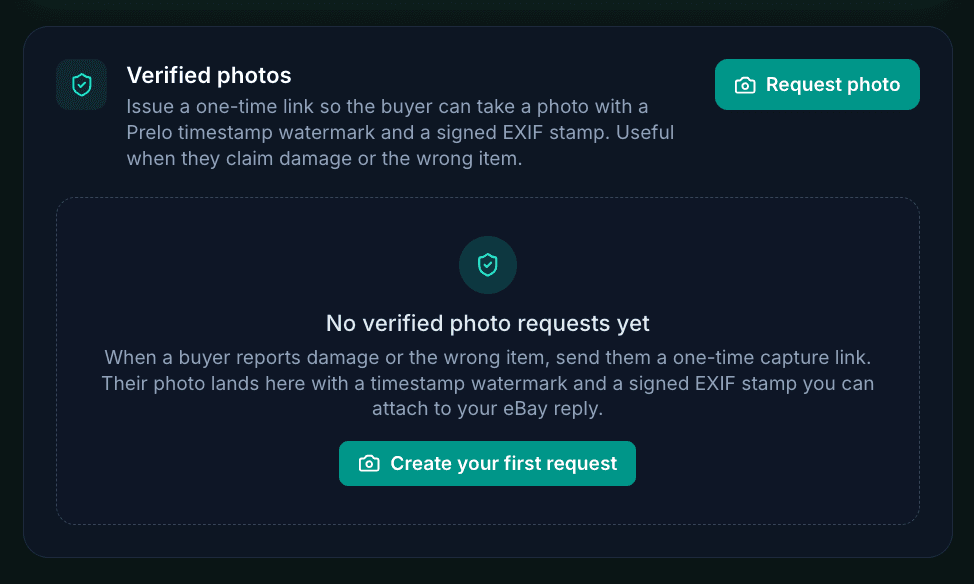
You open the item in your Prelo dashboard, click Request photo, pick the reason (damage, wrong item, condition issue, general), and get back a one-time URL plus a buyer-message template. You paste the URL into the eBay message thread.
The buyer opens the link on their phone. No signup, no app install. Their browser asks for camera access. They tap the capture button. Before the photo leaves their phone, three things happen:
- A visible “PRELO VERIFIED” pill with the exact UTC timestamp gets burned into the pixels of the photo. Anyone looking at the image, on eBay or anywhere else, can see when it was taken.
- An HMAC-signed EXIF stampis written into the file’s metadata. It contains the request id and the capture timestamp, signed with a public salt. If anyone tries to retouch the photo or change the date, the signature stops matching.
- A server signatureover the photo’s SHA-256 hash is calculated when the file lands on our servers. That signature is what you’d show months later as the cryptographic anchor that this photo, with these exact bytes, came through Prelo at this time.
The photo lands in your dashboard with a green Verifiedbadge. You download it, attach it to your eBay reply, and the buyer’s claim now has to contend with a timestamped image they can’t edit without breaking the proof.
How the buyer experiences it
When they open your link they see a clean ListPrelo page with three short reassurances: “Only the seller sees this photo,” “Captured and signed in your browser,” and a tip to use the rear camera in good light. There’s a single big button: Start camera.
They take the photo. They see it on a review screen with a button that says Send to seller (or Submit photo 1 of 2if you asked for more than one). When they’re done, the page says “All photos sent” and they can close the tab.
Buyers like this part. It’s less work than figuring out how to attach a photo to an eBay reply. It also looks professional in a way that a free-form “please send pics” message never does.
What it proves, and what it doesn’t
We’re going to be honest with you here because there’s a lot of marketing copy around “blockchain verified” photo tools and most of it overpromises.
What Verified Photos prove
- The photo was taken at the timestamp on the watermark, not edited in later.
- The image came through Prelo’s capture pipeline, not Photoshop.
- The EXIF metadata has not been tampered with after capture.
- The exact bytes of the file are what we signed at upload time.
What they don’t prove
- That the buyer is lying about the damage.
- That the buyer didn’t break the item themselves before taking the photo.
- That the item in the photo is the one you shipped.
- That the buyer isn’t pointing the camera at a different damaged item.
The verified photo is a baseline. It tells you and eBay what the item looks like now, at this moment, with proof the photo is from now. Combined with your pre-ship photos, it lets you compare two timestamped images of the same item. That comparison is what wins or loses the case.
The seller workflow
- 1Open the item in your dashboard.If it was sold on eBay and shipped, you’ll see a “Verified photos” section. If you don’t see it yet, the item probably isn’t published.
- 2Click Request photo.Pick the reason, add an optional note to the buyer (“please show the front and back in good light”), set how many photos and how long the link is valid. The default is one photo, three days.
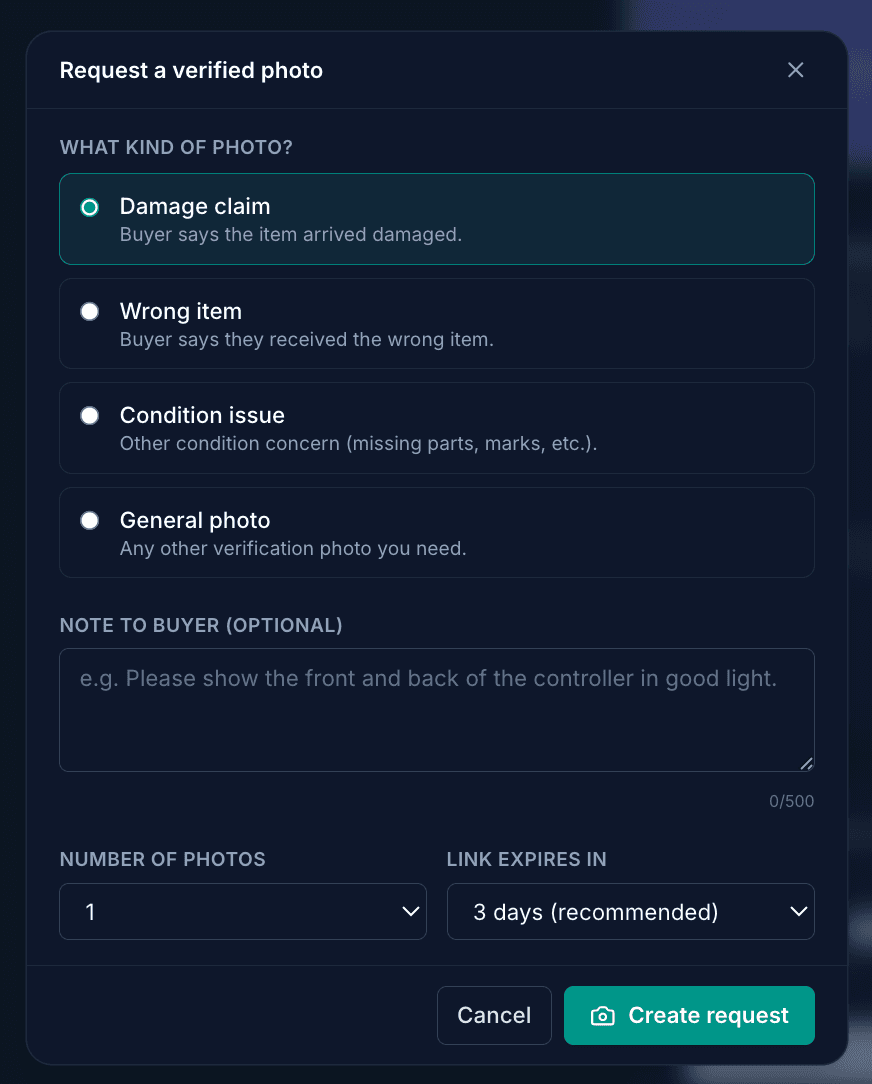
Four reason types, an optional note, and link-expiry control. We default to three days because most buyers respond within 24 hours. - 3Copy the link and message.We give you a pre-written buyer message you can paste into the eBay thread. The link is only shown once for security. We don’t store the raw URL on our side after that.
- 4Wait for the photos.When the buyer completes the request you get an email. The photos appear in the section with a Verified badge and capture timestamps. If the EXIF stamp ever fails verification you’ll see a warning badge instead.
- 5Download and reply.Each thumbnail has a download button. Save the JPEGs, open your eBay message thread, attach them to your reply. The watermark and EXIF travel with the file. Optional: hit the “Reply on eBay” button in Prelo to jump straight to your messages inbox.
Edge cases worth knowing
The buyer refuses to use the link
That’s a signal on its own. eBay case handlers see a seller asking for evidence the buyer wouldn’t provide. Save the message thread. Be polite in your reply and mention you asked for a verified photo to confirm the issue and the buyer declined. You won’t always win that argument, but it shifts the optics.
The buyer sends a photo without using the link
That photo has no timestamp anyone trusts. You can still use it in your reply, but it doesn’t carry the same weight as a Verified Photo. You can offer the link again in a follow-up: “Could you send the same photo through this link so we both have a timestamped record?”
The link expires before the buyer responds
The buyer sees an “Expired” page. They can’t use it anymore. Revoke and re-issue if you need to. We default to a 72-hour window so it’s long enough for buyers in different time zones but short enough that links don’t sit in inboxes for weeks.
The case escalates to eBay
Attach the verified JPEG when you respond to the case. eBay case agents look at the visible timestamp watermark even if they don’t read EXIF data. The watermark is in the image itself, not metadata that gets stripped on re-upload. That’s by design.
Privacy for both sides
The buyer never sees your name, your email, or your seller history. They see the reason you chose, the optional note you wrote, and a capture button. They don’t need a Prelo account.
On our side, the photo is stored encrypted in your account’s private storage. It’s visible to you and nobody else, including the buyer. If the buyer wants a copy of the photo they took, they keep it on their own phone the moment they capture it.
The buyer’s IP address, user agent, and camera resolution are recorded on the evidence row for forensics. None of that is shown to the buyer.
Try it
Verified Photos are included in every Prelo plan. There’s no per-photo charge. The feature appears automatically on any published item in your dashboard.
If you’ve been eating return claims that didn’t feel honest, this is the tool we wish we’d had two years ago.