How to Bulk List 100+ Items on eBay Without Losing Your Mind
Drop a pile of mixed photos. AI sorts them into items. You drag-and-drop to fix anything off. List 100 items in the time it used to take to list 5.
Did you just come back from a big haul and looking at what you have to list feels daunting?
You spent your Saturday at three garage sales and a thrift store. You walked away with sixty mixed items and a phone camera full of unsorted photos. Now it's Sunday afternoon and the pile of stuff in your living room is judging you.
Or maybe you cleared a relative's house and ended up with three hundred items: tools, glassware, a sewing machine, a stack of Pyrex, two boxes of DVDs, a closet of vintage clothes. You photographed everything in one long evening, dreading the part where you actually sit down and list it.
Or — and this happens more than you'd think — you inherited the inventory from a closed-down Blockbuster store. Three thousand DVDs in shrink-wrap. You're not listing those one at a time. You'll be dead before you finish.
Bulk listing is the part nobody talks about honestly. Most reseller tools quietly assume you're listing one item at a time, like a hobbyist. If you're at any real volume, you need a system that handles a pile. Here's the one Prelo built.
The traditional way is broken
Every other reseller tool wants you to follow the same workflow: pick an item, photograph it, upload its photos to a fresh draft, write the listing, save, repeat. For 100 items, that's 100 cycles. Each cycle includes: opening a new draft, dragging photos in one folder at a time, naming the item, typing the title, picking a category, filling out specifics, setting the price, picking shipping options, hitting save.
Even with AI helping with titles and descriptions, you still have to sort your own photos first. Which means scrolling through 300 phone photos and dragging the four shots of the Coach bag into one folder, the five shots of the Pyrex bowl set into another, the three shots of the Singer sewing machine into a third. Folder, folder, folder. For everything.
That sorting step is the bottleneck. It's tedious, it's manual, and it scales linearly with the size of your haul. A 30-item haul takes an hour just to organize. A 300-item estate takes a weekend.
What auto-sort actually does
Prelo's bulk pipeline starts where every other tool ends. You drop the entire pile of phone photos straight in — unsorted, in whatever order you took them. The AI looks at every photo, recognizes which ones show the same physical item from different angles, and groups them automatically. Then it identifies each group against the entire internet — eBay sold listings, auction houses, collector marketplaces — and builds the listing for you.
The sorting that used to be your job is now the AI's job. Your job is to glance at the result, drag-and-drop anything it got wrong, and hit Create.
Three steps, in order:
Step 1 — Drop the pile
Open Prelo, hit Smart Photo Sort, and drag a folder of photos onto the drop zone. Or pick a folder. Or select 200 photos straight from your phone's camera roll. Prelo accepts JPEG, PNG, HEIC straight from iPhone, and WebP. Up to 25MB per file. Up to 200 photos per session.
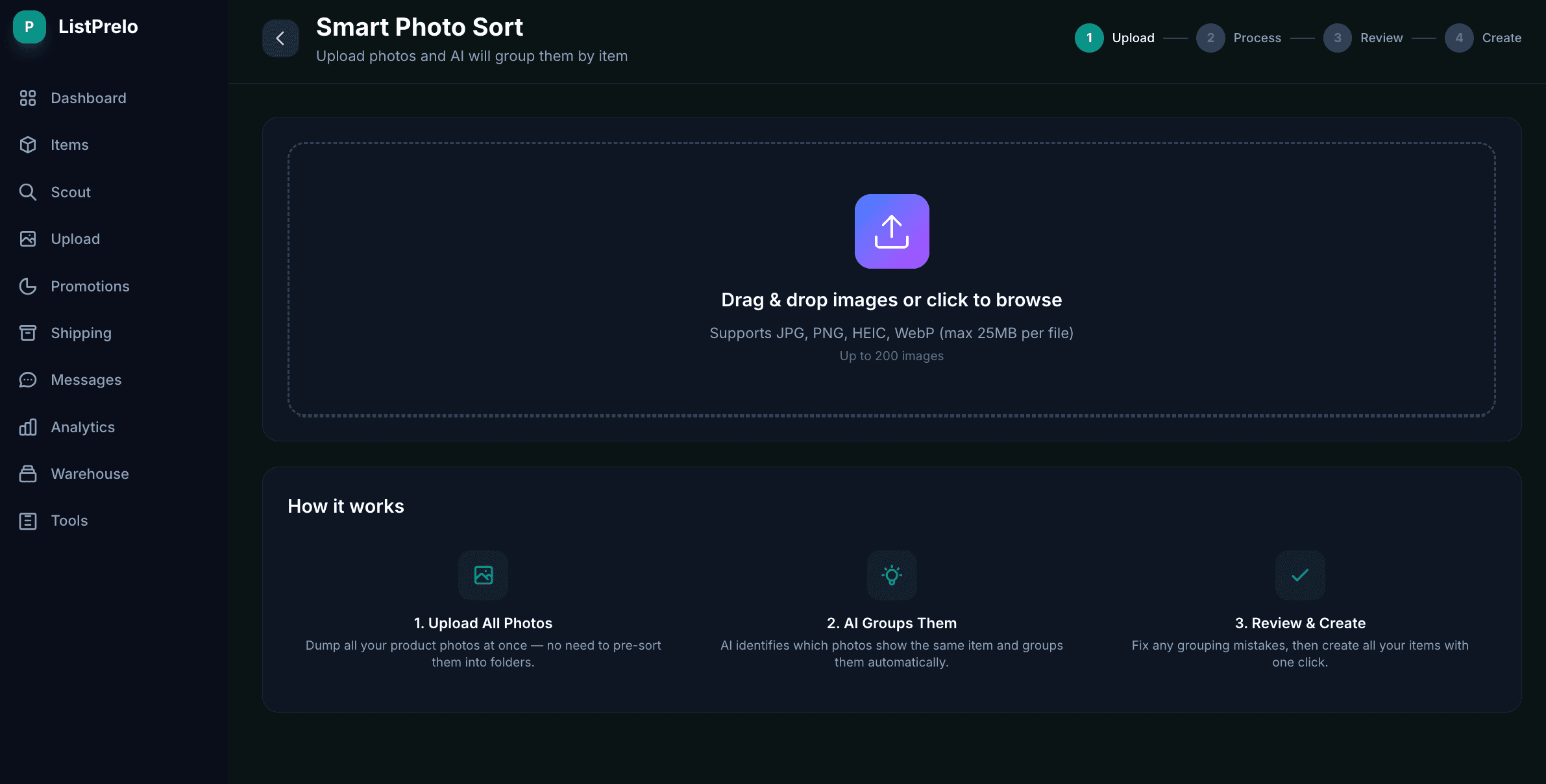
The Smart Photo Sort upload screen. Drop a folder, pick a folder, or select files directly.
You don't need to organize anything in advance. Don't pre-sort into folders. Don't rename files. Don't worry about the order. The whole point is that you skip that step. Just shove the entire haul in.
One quick win if you're shooting your own photos: take the photos of each item in sequence before moving to the next item. Prelo's vision model uses photo proximity as a signal — five photos of the Coach bag taken back-to-back are easier to group than five photos scattered across the camera roll over an hour. It works either way, but consecutive shooting boosts accuracy.
Step 2 — AI sorts, you drag-and-drop to correct
Prelo's vision model runs through the pile and groups photos by item. In our internal test runs, it averages about 94% confidence on the first pass. That means roughly 9 out of every 10 items land in the right group right away.
For the rest, you fix them by hand — and "by hand" means drag-and-drop, not refilling a spreadsheet. Drag any misplaced photo onto the correct item card. Drop a photo on the "+ New item" zone to spin up a new listing for it. Click the trash icon on any group to delete it (its photos drop back into Ungrouped so nothing is lost). Edit the group name inline. Hit Continue when you're satisfied.
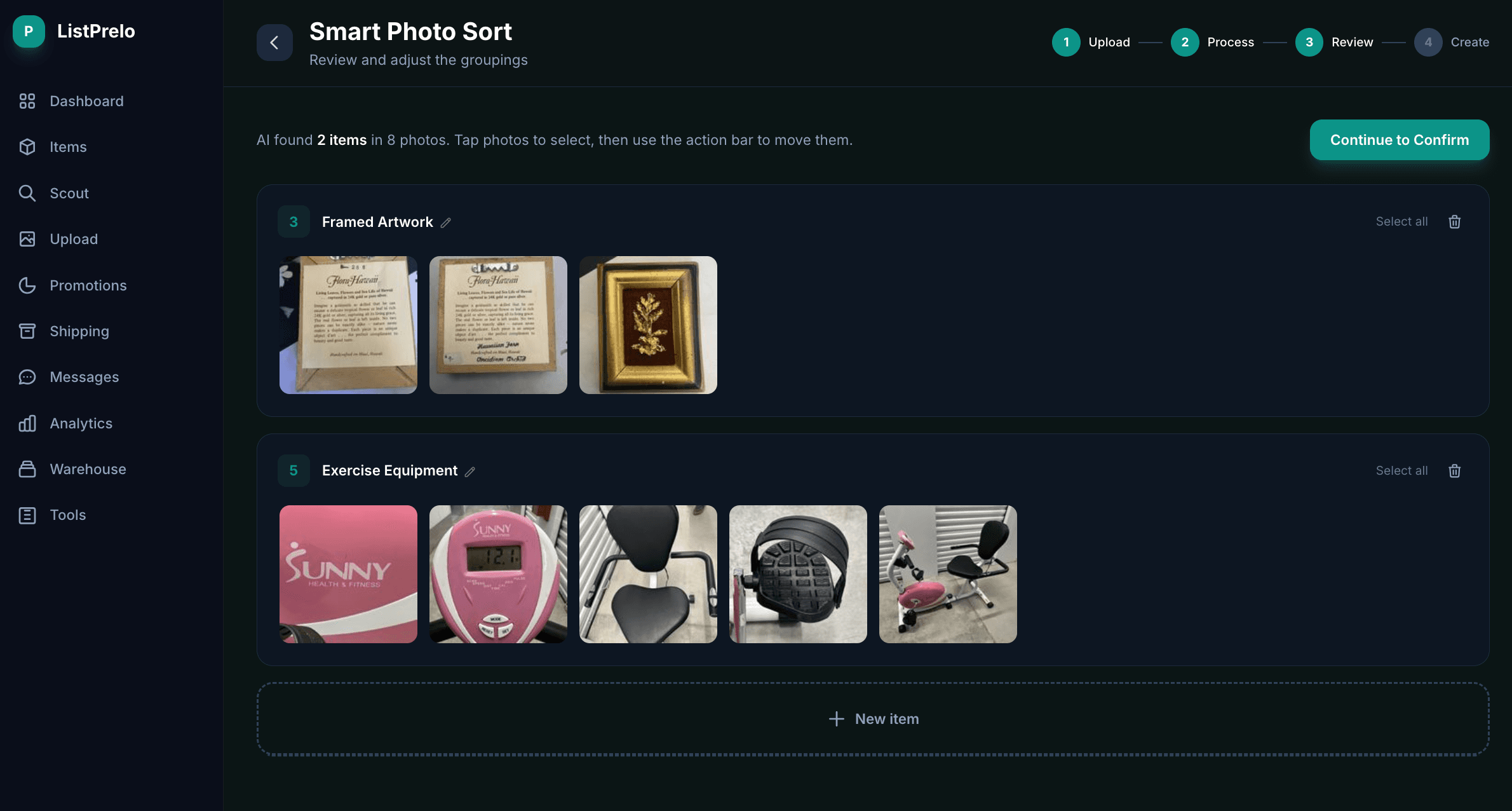
The review screen — drag photos between groups, drop on “+ New item” for a new listing, trash any group with one click.
The mental model is: the AI did 90% of the work; you fix the 10%. Most users spend 30–90 seconds on this step regardless of haul size. A 200-photo pile that the AI grouped into 40 items takes about a minute to review and clean up.
When the AI gets it wrong: usually it's because two items look similar at a glance (two pairs of jeans, two pieces of glassware in the same color). The fix is the same — drag the misplaced photo, drop it on the right group, done. No spreadsheets, no folders, no manual tagging.
Step 3 — Create real listings
Hit "Create N Items" and Prelo turns each group into a real eBay item draft. For every item, the AI runs full identification against the entire internet, pulls real recent sold-comp data, suggests a price, writes a title that includes the right eBay-search keywords, drafts a description, and proposes a category and item specifics.
Those drafts land in your dashboard. You review them on the items page, edit anything that needs editing, and publish straight to eBay in one click. The bulk sort is done by then — what was a 200-photo problem is now a list of 40 ready-to-publish items.
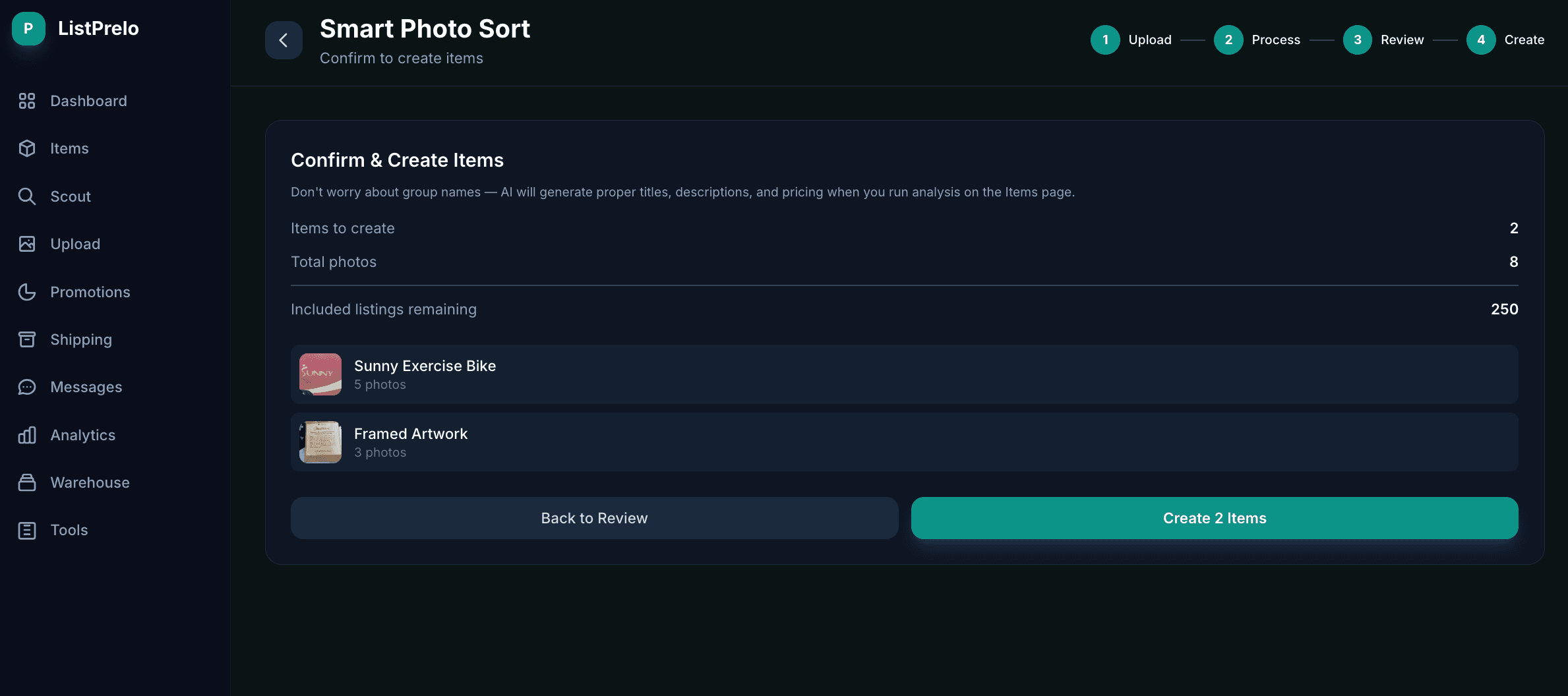
Before you commit, you see the count of items to create, total photos, and your remaining listing credits.
You only pay listing credits when you publish to eBay. Sorting and grouping are free. So if you discover that 5 of your 40 items aren't worth listing (broken, too low-value, you changed your mind), you skip those and pay only for the 35 you publish.
When auto-sort earns its keep
A handful of real scenarios where the bulk pipeline isn't a nice-to-have, it's the whole reason this exists:
The weekend garage-sale flipper
Saturday morning at the sales, sixty items in the back of the car by lunch. Photograph everything on your dining room table Saturday afternoon — phone photos, mixed order, doesn't matter. Drop the whole pile into Prelo Saturday night. Review the groupings, drag-correct a few. Listings drafted by Sunday morning, published by Sunday afternoon. The whole flip cycle stays inside the weekend.
The estate clearer
A relative's house, 300+ items, no idea what most of it is. Photograph every room methodically over a weekend. Drop 50 photos at a time into Prelo. The AI groups and identifies vintage tools, military memorabilia, china, jewelry, electronics — items you couldn't have identified yourself even if you tried. You skip the auction house's 30–40% cut and keep 85–90% of every sale.
The volume collectible inheritance
You inherited two thousand DVDs from a closed Blockbuster store. Or three boxes of vinyl from someone's record-store basement. Or a stamp collection. Or a vintage book library. These are the worst cases for one-by-one listing because volume kills you, but they're easy wins for bulk sort — each disc, record, book, or stamp gets its own group, ID'd against real sold comps, priced based on the actual collector market. The AI doesn't get bored.
The storage-unit auction buyer
You won a unit at the auction house and now have a moving truck full of someone else's life. Half of it is junk; the other half pays for the unit twice over — if you can find it. Drop everything into Prelo a box at a time. The AI tells you what's actually valuable before you've finished going through it.
The volume reseller, weekly batch
If you're doing 200+ listings a month, you probably already have a system. Bulk sort drops on top of it. Photograph your whole week's intake on Monday, drop it Tuesday, review Wednesday, publish over the rest of the week. Your time per listing collapses by an order of magnitude — and you stop dreading the new-intake day.
Tips to get better grouping accuracy
Auto-sort works on any pile, but a few small habits cut your manual-correction time in half:
Do
- Photograph each item's shots back-to-back before moving on
- Include the same kind of reference shot per item (e.g. front, back, tag, condition close-up)
- Shoot on a consistent background — same table, same lighting
- Capture maker's marks, model numbers, and serial plates
- For collectibles: include scale references (a coin or ruler in the frame)
Don't
- Mix photos of two different items in the same frame
- Skip the maker's mark or model number — that's how the AI identifies it
- Photograph in heavy shadow or with flash glare
- Pre-sort into folders. Just don't. That's literally the step we're replacing.
None of these are required. A truly chaotic pile with mixed lighting and inconsistent angles still works — the AI will just hand you a few more correction-drags at the review step.
Which plan you need
Smart Photo Sort itself is free. You only pay listing credits when you commit to creating and publishing items. The plan tiers govern how many photos you can pile into a single sort session:
Pay-Go — $0.25 per listing
20 free credits at signup. Smart Sort + Scout included. Best for one-off hauls and estate cleanouts where you don't want a monthly commitment.
Starter — $12.99 / month
50 AI listings included. Bulk sort + analyze up to 25 photos per session. Best for weekend flippers doing 20–50 items per haul.
Pro — $34.99 / month
200 AI listings included. Bulk sort + analyze up to 100 photos per session. Warehouse + inventory tools. Best for volume resellers, estate clearers, and bulk inheritance unloads.
Going through several thousand items (Blockbuster-scale)? Email [email protected] and we'll set up a custom volume plan with a higher per-session photo cap.
Does bulk listing hurt listing quality?
Honest answer: no, but it depends on you reviewing the AI's work before hitting publish.
The AI writes a competent listing for every item — title with the right keywords, accurate description based on what it identified, category and item specifics filled in, suggested price based on real sold comps. For 80% of items, you can publish that draft as-is and it'll perform fine. For the remaining 20% (high-value items, items where you know more than the AI does, items with damage the AI couldn't see in the photos), spend an extra 30 seconds editing the description before you publish.
The math still works out massively in your favor. One-at-a-time listing takes 5–10 minutes per item. Bulk listing with a 30-second review per item takes — well, 30 seconds. Per item. Even on items where you spend 2 minutes polishing the listing, you're still 60% faster.
Drop a pile of photos. Get a stack of listings.
20 free listings on signup. No card required. Try Smart Photo Sort on whatever pile you have sitting in your dining room right now.
Start free with 20 listingsBuilt on eBay's official Trading API · Smart Sort + Scout always free